
Construction website design is the work of building a website that turns a search for a builder into a phone call, an estimate request or a bid invitation. The construction websites that win jobs do nine things well, and every one of them follows a single rule: McCoy’s Law of Conversion Optimization. Make it easy for people to do what you want them to do. M. Curtis McCoy has built websites since 1995, three years before Google, and applies that rule to every contractor site his team builds.
See where your site stands: the free Website Analyzer grades your leads, speed, search visibility and AI readiness in about a minute.
What Is Construction Website Design?
Construction website design is web design built around how construction buyers decide. A homeowner planning a custom home, a property manager hiring a general contractor and a developer looking for a sub all do the same three things: they search, they look for proof, and they contact the company that makes the next step easiest.
A good-looking site is not enough. A construction website has to be found on Google, the map and AI answers, prove the work is real, and make contacting you one tap. That is the difference between a brochure and a website that books jobs.
McCoy’s Law: The Rule Behind Construction Website Design That Converts
McCoy’s Law of Conversion Optimization states: make it easy for people to do what you want them to do. Every extra step, decision or unknown between a buyer’s intent and your call to action costs you jobs.
Apply it to a construction website by counting three things on a phone, starting from the Google result:
- Steps: how many taps it takes to call you or request an estimate.
- Decisions: how many competing buttons, menus and offers the visitor has to sort through.
- Unknowns: the questions left unanswered, such as where you build, what you build, how long it takes and what happens after they reach out.
Lower is better on all three. The standard is simple: do every step for the buyer except the final yes.
The 9 Elements of Construction Website Design That Win Jobs
1. A Homepage That Says What You Build and Where in Five Seconds
The first screen answers three questions: what you build, where you build it and how to reach you. “Custom log homes in Western Colorado” beats “Building Dreams Since 2004.” If a visitor has to scroll to learn your trade, McCoy’s Law is already broken.
2. Tap-to-Call and Tap-to-Text on Every Screen
Most construction buyers find you on a phone. Put a call button and a text button where a thumb lands, on every page. Text matters: some buyers would rather send a quick message from work than make a call.
3. A Page for Every Service You Sell
One “Services” page with a bulleted list ranks for nothing. Give each profitable service its own page: new construction, remodels, additions, restoration, commercial work. Each page answers the buyer’s real questions about that job, with photos of that work.
4. A Page for Every Town or Region You Build In
Buyers search by place. A page for each town or region you serve, written about local conditions, permits and the projects you have completed there, ranks for those searches. Never swap the city name into a copied page. Google treats that as scaled content abuse, and buyers can tell.
5. Project Galleries With Real Photos and Captions
Homeowners hire the crew whose finished work they can see. Use your own photos, not stock images, and caption each one with the place, the job and the month. Captions turn a gallery into proof, and they give search engines words to rank.
6. Proof Where Buyers Decide
Place reviews, license and insurance details, warranties and years in business next to the call button, not on a separate page nobody opens. Proof removes the biggest unknown in construction: can this company be trusted with my money and my property?
7. Estimate and Bid Request Forms That Qualify
A short form that asks project type, location, timeline and budget does two jobs. It makes the request easy, and it tells you which buyers to call first. Pencil Log Pros goes further: its Log Home Repair Estimator lets homeowners describe the project and upload photos to get a ballpark estimate, so visitors arrive as named, qualified leads.
8. Fast on a Phone
Google indexes the mobile version of your site first, so the phone experience is the one that counts. Google’s mobile-first indexing guide explains why. Aim for Google’s Core Web Vitals targets: the main content loads in 2.5 seconds or less, the page responds to a tap in 200 milliseconds or less, and the layout does not jump while it loads (a layout shift score of 0.1 or less). Heavy hero videos and oversized photos are the usual problems on construction websites.
9. Built to Be Found on Google, the Map and AI Answers
Construction website design and SEO belong in the same project. Local results on Google are based on relevance, distance and prominence, according to Google Business Profile Help. Your website feeds all three: clear service and town pages, a matching Google Business Profile and steady reviews. The same clarity helps ChatGPT, Gemini and Google’s AI answers name your company when a buyer asks for a builder. If your site looks good but nobody finds it, read why your website is not showing up on Google.
Want these nine built for you? See how M. Curtis McCoy handles contractor website design, from the first page to the monthly ranking work.
Construction Website Design Examples
Two live construction websites built and managed by M. Curtis McCoy’s team. Open them on your phone and count the taps.
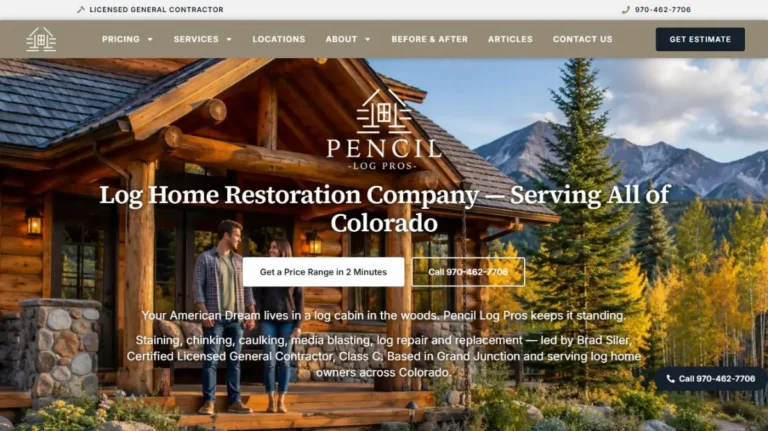
Pencil Log Pros has a service page for every specialty, location pages across two states written around local conditions, the Log Home Repair Estimator and a review system. The result: the company had to hire more crew to keep up. Read the Pencil Log Pros case study.
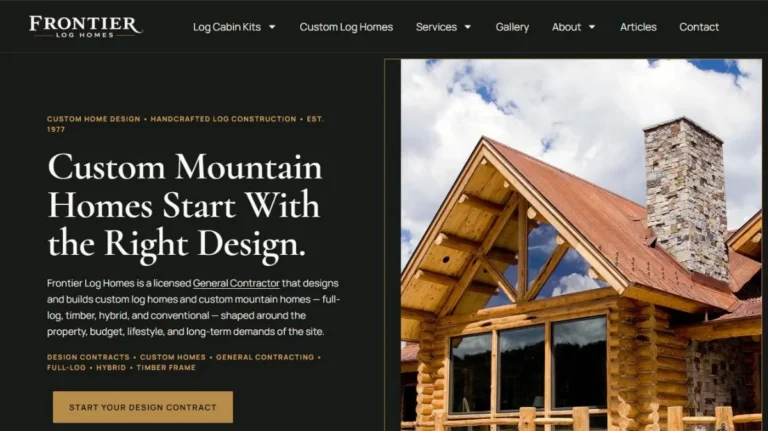
Frontier Log Homes sells two ways: custom log home builds in Colorado and log cabin kits shipped nationwide. The site gives each path its own pages and its own request form, so a kit buyer and a custom-home buyer each get one clear next step.
Construction Website Design Mistakes That Cost Jobs
- Template leftovers. We have seen a remodeling contractor’s live site still showing a placeholder phone number, (123) 456-7890, in the header and footer. Every call it should have produced went nowhere.
- Content search engines cannot read. Some site builders load the text with JavaScript only. Buyers see the page; some crawlers and AI tools see almost nothing.
- A contact page as the only call to action. It adds a step to every visit.
- Galleries with no captions. Beautiful, and invisible to search.
- Nobody working the site after launch. Rankings come from steady work every month, not from the launch date.
Who Should Build Your Construction Website?
| DIY site builder | Template web company | M. Curtis McCoy | |
|---|---|---|---|
| Built for your trade and towns | You write it all | Often one template for every client | Yes, page by page |
| SEO and AI search | Up to you | Often basic setup only | Built in, then worked every month |
| Hosting and security | Platform default | Often a separate bill | Included, managed for you |
| See it before you pay | Not applicable | Rarely | Yes, on our staging server |
| Who runs it after launch | You | Often nobody | One independent contractor manages everything |
Construction Website Design: Questions Builders Ask
What should a construction company website include?
A clear homepage, a page for every service and every area you serve, real project galleries with captions, reviews and license details, tap-to-call and tap-to-text buttons, and a short estimate form. Those nine elements are listed above.
How long does construction website design take?
With M. Curtis McCoy’s team, a finished site is usually ready on a staging server in about 10 days, and you review it before you pay.
Does a construction website need SEO?
Yes. A construction website that is not built for search depends on referrals and paid leads. SEO, local SEO and AEO are what put your company in front of buyers who are searching right now.
Is construction website design different from contractor website design?
They overlap. Construction website design usually covers builders and construction companies; contractor website design covers trades like roofing, plumbing and remodeling too. The same nine elements apply to both. See contractor website design by M. Curtis McCoy.
How much does a construction website cost?
It depends on how many services and areas you cover and whether hosting, security and ongoing SEO are included. See the pricing page for what M. Curtis McCoy’s managed websites include.
Get a Construction Website That Wins Jobs
Run the free Website Analyzer to see where your site breaks McCoy’s Law, or see how M. Curtis McCoy builds and manages contractor and construction websites. Prefer to talk? Call or text 970-986-2471.
